This page looks best with JavaScript enabled

Writing Guide (org + ox-hugo)

 ·   ·  โ˜• 6 min read · ๐Ÿ‘€... views

I’ve recently switched to org mode, now I write all my blogs in org mode (blog-src/content-org/), and export them to .md files (blog-src/content/) with ox-hugo.

So instead of editing .md files under content folder, now I write .org files stored under content-org folder.

Create new post

Invoking org-capture-templates (SPC o c) function, and choose hugo post template, as shown in Figure 1

Figure 1: creating new post with org-capture-template

Figure 1: creating new post with org-capture-template

After creating the new post, you can export it to markdown files under content folder with M-x org-export-dispatch.

Front matter

As in ox-hugo: Custom Front-matter Parameters, hugo front matters can be added like below:

1
2
3
4
5
:PROPERTIES:
:EXPORT_HUGO_CUSTOM_FRONT_MATTER: :key1 value1 :key2 value2
:EXPORT_HUGO_CUSTOM_FRONT_MATTER+: :key3 value3
:EXPORT_HUGO_CUSTOM_FRONT_MATTER+: :key4 value4
:END:

some important front matters can be stored in your org capture template, here’s my template:

 1
 2
 3
 4
 5
 6
 7
 8
 9
10
11
12
13
14
15
16
17
18
19
20
21
22
23
24
25
26
27
28
29
30
31
32
33
34
35
(defun org-hugo-new-subtree-post-capture-template ()
  "Returns `org-capture' template string for new Hugo post.
 See `org-capture-templates' for more information."
  (let* (;; http://www.holgerschurig.de/en/emacs-blog-from-org-to-hugo/
         (date (format-time-string (org-time-stamp-format :long :inactive) (org-current-time)))
         (title (read-from-minibuffer "Post Title: ")) ;Prompt to enter the post title
         (fname (org-hugo-slug title)))
    (mapconcat #'identity
               `(
                 ,(concat "\n* TODO " title "  :@cat:tag:")
                 ":PROPERTIES:"
                 ,(concat ":EXPORT_HUGO_BUNDLE: " fname)
                 ":EXPORT_FILE_NAME: index"
                 ,(concat ":EXPORT_DATE: " date) ;Enter current date and time
                 ":EXPORT_HUGO_CUSTOM_FRONT_MATTER: :image \"/images/icons/tortoise.png\""
                 ":EXPORT_HUGO_CUSTOM_FRONT_MATTER+: :libraries '(mathjax)"
                 ":EXPORT_HUGO_CUSTOM_FRONT_MATTER+: :description \"this is a description\""
                 ":END:"
                 "%?\n")
               "\n")))
(with-eval-after-load 'org-capture
  (setq hugo-content-org-dir "~/git-repo/blog/blog-src/content-org")
  (add-to-list 'org-capture-templates
               `("pe"
                 "Hugo Post (en)"
                 entry
                 (file ,(expand-file-name "all-posts.en.org" hugo-content-org-dir))
                 (function org-hugo-new-subtree-post-capture-template)))
  (add-to-list 'org-capture-templates
               `("pz"
                 "Hugo Post (zh)"
                 entry
                 (file ,(expand-file-name "all-posts.zh.org" hugo-content-org-dir))
                 (function org-hugo-new-subtree-post-capture-template)))
  (add-to-list 'org-capture-templates '("p" "Hugo Post")))

Code

Inline code with ‘=’ or ‘~’: =echo 123=, ~echo 456~

Code block with

1
2
3
4
5
#+begin_src c
  int main() {
    return 0
  }
#+end_src

Tables

create tables1 as you would in normal org mode.

NamePhoneAge
Peter123427
Anna432118
1
2
3
4
| Name  | Phone | Age |
|-------+-------+-----|
| Peter |  1234 |  27 |
| Anna  |  4321 |  18 |

Images

include existing images

Store all the images under $HUGO_BASE_DIR/static/ folder (except some generated images), so just include them using relative path from the org file.

You can add caption and name (for referencing purpose: as in figure 2) to an image.

Figure 2: Gogpher

Figure 2: Gogpher

1
2
3
4
#+CAPTION: Gogpher
#+NAME: fig:gopher
#+ATTR_HTML: :width 30%
[[../static/images/icons/gopher001.png]]

paste image from clipboard

You can also paste images from clipboard with org-download2. I’ve bind C-M-y to paste images, and the pasted image will be stored under path ../static/images/posts/<Level-0-Header-Name>.

You can customize with the .dir-locals.el file:

1
2
3
((org-mode . ((org-download-timestamp . "")
              (org-download-heading-lvl . 0)
              (org-download-image-dir . "../static/images/posts"))))

generate images

You can use org babel to evaluate (tangle) C-c C-c source block to multiple results. One of them being images. then you can add some attributes to the result (width, name, caption, etc.).

The source block could be latex or plantuml3, etc.

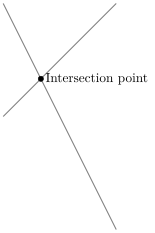
Figure 3: tikz example

Figure 3: tikz example

1
2
3
4
5
6
7
#+begin_src latex :file ../static/images/posts/Writing-Guide-Org/tikz_example.svg :exports results :results file graphics
  \begin{tikzpicture}
    \draw[gray, thick] (-1,2) -- (2,-4);
    \draw[gray, thick] (-1,-1) -- (2,2);
    \filldraw[black] (0,0) circle (2pt) node[anchor=west]{Intersection point};
  \end{tikzpicture}
#+end_src
1
2
3
4
5
6
7
8
9
#+begin_src plantuml :file "../static/images/posts/Writing-Guide-Org/first.svg"
  @startuml
  title Authentication Sequence

  Alice->Bob: Authentication Request
  note right of Bob: Bob thinks about it
  Bob->Alice: Authentication Response
  @enduml
#+end_src
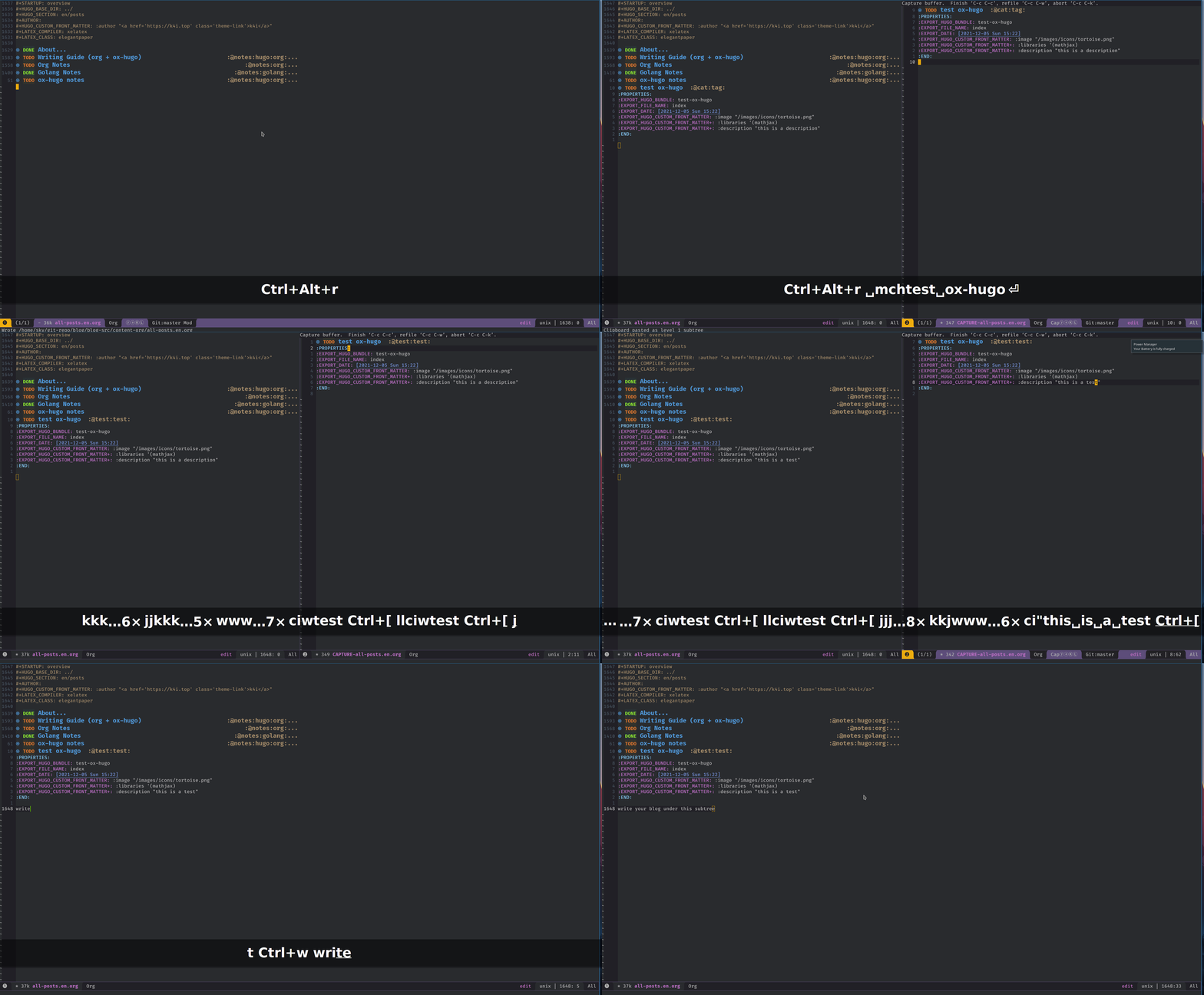

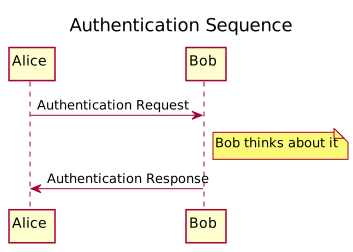
Figure 4: this is first.svg

Figure 4: this is first.svg

you can export ASCII diagrams by changing file extension to .txt (this will export diagram to a text file) or if you want to just include the ASCII diagram itself, set :results to verbatim.

1
2
3
4
5
6
7
8
9
#+begin_src plantuml :results verbatim
  @startuml
  title Authentication Sequence

  Alice->Bob: Authentication Request
  note right of Bob: Bob thinks about it
  Bob->Alice: Authentication Response
  @enduml
#+end_src
 1
 2
 3
 4
 5
 6
 7
 8
 9
10
11
12
13
14
15
16
             Authentication Sequence

,-----.                   ,---.
|Alice|                   |Bob|
`--+--'                   `-+-'
   |Authentication Request  |
   |----------------------->|
   |                        |
   |                        | ,-------------------!.
   |                        | |Bob thinks about it|_\
   |                        | `---------------------'
   |Authentication Response |
   |<-----------------------|
,--+--.                   ,-+-.
|Alice|                   |Bob|
`-----'                   `---'

Math Support (with MathJax)

We need to have MathJax library in our front matter.

1
2
3
:PROPERTIES:
:EXPORT_HUGO_CUSTOM_FRONT_MATTER+: :libraries '(mathjax)
:END:

Inline formulas with \$..\$. This is inline math: \(x^2 + y^2 = z^2 \frac{1}{2}\).

Displayed equations with \$\$..\$\$ or \(\LaTeX\) environments. This is displayed math:

The code:

1
2
3
4
5
6
7
8
\begin{equation}\label{eq:1}
  \begin{split}
    a &= b+c-d\\
      &\quad +e-f\\
      &= g+h\\
      &= i
  \end{split}
\end{equation}

will be rendered as:

\begin{equation}\label{eq:1}
\begin{split}
a &= b+c-d\\
&\quad +e-f\\
&= g+h\\
&= i
\end{split}
\end{equation}

you can use cdlatex4 to simplify your math typing.

Presentation

Shortcodes

zoo-docs5 on short codes

to use shortcodes as you do in markdown, put it after #+html:. Like this:

1
#+html: {{< gallery dir="/image_dir/" >}}

Alert

You can have alert like this:

1
2
3
#+html: {{< alert theme="info" dir="ltr" >}}
theme could be one of: success, info, warning, danger
#+html: {{< /alert >}}

Notice

1
2
3
#+html: {{< notice success "This is a success type of notice" >}}
notice could be success, info, warning, error.
#+html: {{< /notice >}}
success notice.
info notice.
warning notice.
error notice.

Simple box

1
2
3
#+html: {{< box >}}
Plain text
#+html: {{< /box >}}
Plain text

Code in multiple language

 1
 2
 3
 4
 5
 6
 7
 8
 9
10
11
12
#+html: {{< codes java javascript >}}
  #+html: {{< code >}}
  #+begin_src java
    System.out.Println("Hello World!");
  #+end_src
  #+html: {{< /code >}}
  #+html: {{< code >}}
  #+begin_src javascript
    console.log('Hello World!');
  #+end_src
  #+html: {{< /code >}}
#+html: {{< /codes >}}
1
System.out.Println("Hello World!");
1
console.log('Hello World!');

Tab

 1
 2
 3
 4
 5
 6
 7
 8
 9
10
11
12
13
14
15
16
17
18
19
20
21
22
23
#+html: {{< tabs Windows MacOS Ubuntu >}}
  #+html: {{< tab >}}

  *** Windows section

  #+begin_src javascript
    console.log('Hello World!');
  #+end_src

  #+html: {{< /tab >}}
  #+html: {{< tab >}}

  *** MacOS section

  Hello world!
  #+html: {{< /tab >}}
  #+html: {{< tab >}}

  *** Ubuntu section

  Great!
  #+html: {{< /tab >}}
#+html: {{< /tabs >}}

Windows section

1
console.log('Hello World!');

MacOS section

Hello world!

Ubuntu section

Great!

Expand

1
2
3
#+html: {{< expand "Expand me" >}}
Some Markdown Contents
#+html: {{< /expand >}}

Some Markdown Contents

1
2
3
4
5
6
7
package main

import "fmt"

func main() {
  fmt.Println("hello sky!")
}

video

netease music

need to allow third party cookies

1
2
neteasemusic id="1455273374"
neteasemusic id="8003580862" isList="true"

References

1
2
3
You can refer to something in the footnote like ox-hugo[fn:ox-hugo]
* Footnotes
[fn:ox-hugo] [[https://ox-hugo.scripter.co/][ox-hugo official site]]

You can refer to something in the footnote like ox-hugo6

Share on